Moving abroad often means joining new communities before you know anyone in person. A class server can hold course updates, a gaming group can keep friends connected across time zones, and a local community can answer practical questions. A Huawei phone can handle that routine smoothly when Discord is installed from a trusted source and its permissions are set with care.
Install Discord from AppGallery
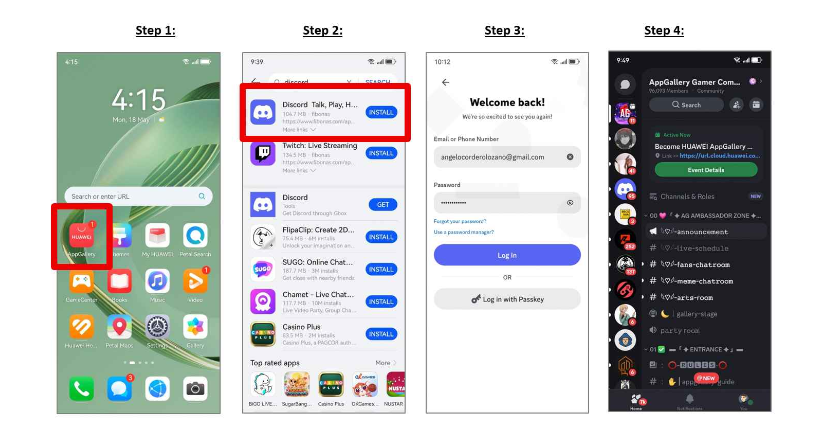
Open HUAWEI AppGallery and search for Discord. Check the app name and publisher before tapping Install. Huawei’s community walkthrough for huawei discord gives users this direct starting point and notes that the app can be downloaded through AppGallery.
Availability may differ by market, device model, or software version. If the result does not appear, confirm that the region linked to your HUAWEI ID matches your current location. Update AppGallery and the phone software, restart the device, and search again. Avoid modified packages from unknown websites, especially because Discord may contain private messages, account links, and community invitations.
Sign In and Test the Main Features
After installation, sign in on a trusted network and open a server you already use. Test a text channel, direct message, voice channel, image upload, and notification. Discord supports text, voice, and video communication, so opening the home screen alone does not confirm that every feature is ready.
For a practical Huawei Discord setup, allow microphone, camera, and photo access only when needed. Choose notification settings by server rather than enabling every alert. Muting busy channels while keeping mentions and direct messages active makes the app easier to use throughout the day.
Use Servers for Life Abroad
Discord servers can support study groups, professional communities, hobbies, gaming, and private friend circles. Organise your server list so essential communities stay easy to find. Read channel descriptions and rules before posting, since many servers separate announcements, questions, voice chat, and off-topic discussion.
Be cautious with unsolicited direct messages, shortened links, and files from unknown members. Do not share passport images, booking codes, financial details, or a precise live address. Community advice can be useful, but official sources should remain the final reference for immigration, healthcare, banking, or public safety.
Control Data and Background Activity
Voice calls, video, screen sharing, and media-heavy channels can use mobile data quickly. When travelling with a limited local SIM, use Wi-Fi for long calls and large uploads. If alerts arrive late, review notification permission, mobile-data access, App launch, and battery management.
Do not remove every restriction without checking the impact. Give Discord enough background access for the alerts you need, then test a direct message with the screen locked. This is more useful than changing several settings at once.
Keep the Setup Reliable
Return to AppGallery to check for updates, especially after a major phone software change. If Discord becomes slow, restart the app, switch networks, and clear the cache before reinstalling.
The huawei discord page provides the Huawei-specific installation reference. Starting from that official route, then managing server notifications, permissions, privacy, and data use, creates a safer and more dependable experience abroad.